
Musify App: Free Open-Source Music Streaming for Android
Musify is a free, open-source Android music app that streams 100 million+ songs from YouTube Music — with no ads, no subscription, and no account required. Developed by Valeri Gokadze under the GPL (General Public License) v3.0, the app reached version 10.0.2 in March 2026 and has 3.8k+ GitHub stars. This guide covers both versions of Musify, every major feature, version history, and how to download the app.
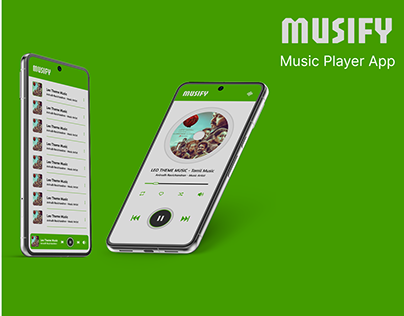
2 Different Apps Called Musify — Know the Difference
There are 2 separate products with the name Musify. Choosing the wrong one causes confusion.
| Product | Description |
| Musify (Open-Source Android App) | Free music streaming app for Android. Built by Valeri Gokadze on Flutter. Available on GitHub and F-Droid. No ads, no subscription. Streams YouTube Music catalog. This is the main subject of this article. |
| Musify Music Downloader (iTubeGo) | Desktop software for Windows and Mac. Paid/freemium tool that downloads songs from Spotify, YouTube, SoundCloud, and 1,000+ sites. Converts to MP3, FLAC, M4A up to 320kbps. Different company, different product. |
What Is Musify App?
Musify is an open-source Android music streaming app created by Valeri Gokadze. The app uses the YouTube Music API (Application Programming Interface) and Piped APIs to stream 100 million+ songs without requiring a YouTube Music or Spotify subscription.
It runs on Android 7.0 (Nougat) or newer. The app is not on the Google Play Store — likely due to YouTube API policies — and installs via APK sideloading from GitHub or F-Droid. No root access is required.
If you want a smooth and simple way to explore music-based apps, you can try Forgotify APK for a lightweight and easy-to-use option.
Musify App Features
Musify has 14 core features that match or exceed paid streaming apps in most categories.
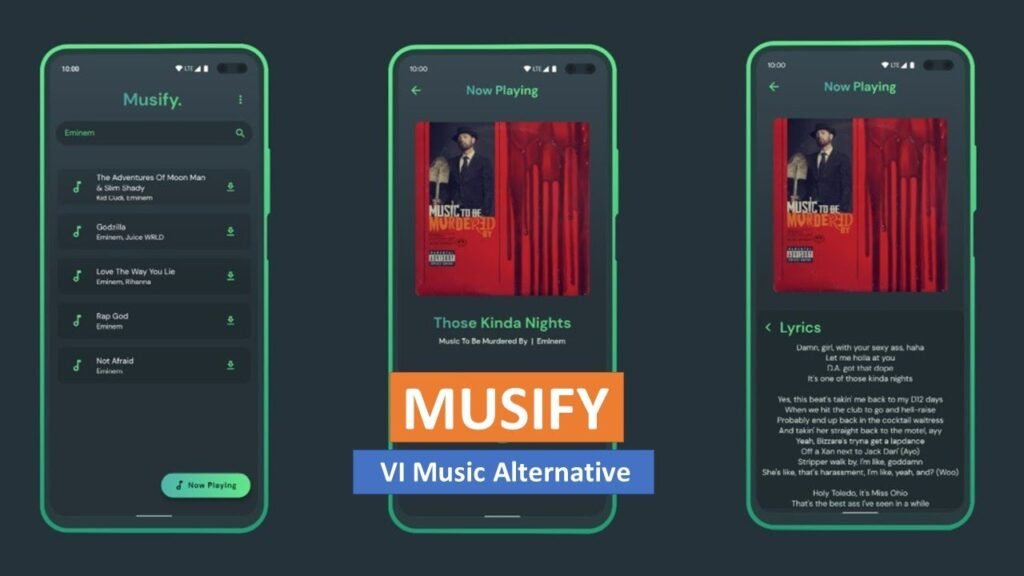
- Online song search: Search by song title, artist name, album, or playlist. Results include YouTube Music catalog content.
- Offline listening: Download songs to local storage for playback without internet. No limit on number of downloads.
- Background playback: Music plays with the screen off or while using other apps — a feature YouTube’s free tier blocks.
- Synchronized lyrics: Real-time lyrics display that scrolls with the song. Lyrics load automatically when available.
- Custom playlists: Create, import, and export playlists. Add playlists via URL link. Share playlists across apps.
- SponsorBlock support: Automatically skips sponsored segments in long-form audio content and podcasts.
- Android Auto support: Full voice and touch control via Android Auto while driving. Play, pause, skip, shuffle, repeat.
- Custom equalizer: Adjust bass, treble, filter, range, and spatial audio levels per preference.
- Import & export data: Back up and restore your library, playlists, and preferences across devices.
- Sleep timer: Set automatic stop time — preset intervals or custom duration.
- Material You design: Dynamic color theming on Android 12+. Pure black OLED mode available.
- Playlist folder management: Organize playlists into folders (added in v9.6.0, now stable in v10.0.2).
- Proxy support: Built-in proxy service for users in regions with playback restrictions (added v9.6.1).
- Recently played history: Tracks up to 250 recently played songs — increased from 50 in v10.0.0.
Musify Version History: GitHub Major Releases
Valeri Gokadze releases Musify updates monthly. These are the 10 most significant version milestones from the GitHub changelog.
- v9.0.3 (Dec 2024): Updated target SDK to Android 15 support. Fixed repeat mode buffering. Enabled carousel item snapping on home page.
- v9.1.0 (Feb 2025): Added support for larger screen devices. Improved lyrics formatting. Enhanced UI consistency.
- v9.3.0 (Apr 2025): Added ‘Play Next’ queue control. Added offline playlists. Fixed lyric-related bugs. Updated Japanese and Korean translations.
- v9.6.0 (Jul 2025): New playlist folder management (Beta). Redesigned sponsor section. Smoother offline/online mode transitions.
- v9.6.1 (Jul 2025): Added proxy service for users with playback problems. Updated Japanese translations. Performance and UI fixes.
- v9.6.2 (Aug 2025): Added Hungarian and Estonian language support (total: 21 languages). Fixed search and proxy issues.
- v9.9.1 (Mar 2026): Added Shuffle Play for liked songs, offline songs, and recently played pages. Added Clear Queue confirmation dialog.
- v10.0.0 (Mar 2026): Major UI overhaul. Increased recently played limit from 50 to 250. Added link sharing — copy a track link and open in Musify.
- v10.0.1 (Mar 2026): Further UI improvements. Resolved bugs from v10.0.0. Introduced missing options.
- v10.0.2 (Mar 22, 2026): Improved ‘Add to playlist’ dialog with folder support. Updated icons for consistent look. Improved offline mode filtering, sorting, and queue handling.
How to Download Musify APK on Android
Musify is not on the Google Play Store. Download the APK from 2 official sources: GitHub or F-Droid.
Method 1: Download from GitHub (Recommended for Latest Version)
- Open your Android browser and go to: github.com/gokadzev/Musify/releases
- Find the latest release (currently v10.0.2) and tap the .apk file to download.
- Open phone Settings > Security > Install from Unknown Sources and enable it for your browser app.
- Open the downloaded APK file from your Downloads folder.
- Tap Install and wait for the installation to complete.
- Open Musify, search a song, and start listening.
Method 2: Download from F-Droid (Recommended for Auto-Updates)
- Install the F-Droid app from f-droid.org on your Android device.
- Open F-Droid and search for ‘Musify’.
- Select the Musify app by gokadzev and tap Install.
- F-Droid sends update notifications when new Musify versions release — no manual checking required.
Musify vs Spotify vs YouTube Music: Side-by-Side Comparison
This table compares Musify’s free tier against Spotify’s free and premium tiers and YouTube Music Premium.
| Feature | Musify (Free) | Spotify Free / Premium |
| Cost | Free forever | Free (ads) / $11.99/month |
| Ads | Zero ads | Ads on free / No ads on Premium |
| Offline downloads | Unlimited, free | Premium only |
| Background play | Yes, always | Premium only on mobile |
| Audio quality | Up to 320 kbps | Up to 320 kbps (Premium) |
| Android Auto | Full support, free | Premium only |
| Lyrics | Synchronized, free | Premium only (full sync) |
| Account required | No account needed | Account required |
| Catalog size | 100M+ (YouTube) | 100M+ songs |
| Platform | Android only | iOS, Android, Web, Desktop |
| Open source | Yes — GPL v3.0 | No — closed source |
Musify Music Downloader (iTubeGo) — Desktop Version
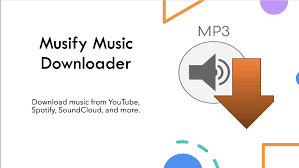
The iTubeGo Musify Music Downloader is a separate commercial product for Windows and Mac. It downloads songs from 1,000+ streaming platforms — Spotify, YouTube, SoundCloud, Apple Music, Amazon Music, and Deezer — and converts them to MP3, FLAC, M4A, WAV, and 20 other audio formats.
- Supported platforms: 1,000+ sites including Spotify, YouTube, SoundCloud, Apple Music, Amazon Music, TikTok, Facebook, Instagram, Vimeo.
- Output formats: MP3, AAC, FLAC, M4A, WAV, WMA, OGG, OPUS, and 15+ others.
- Maximum audio quality: Up to 320 kbps MP3. Lossless FLAC output supported.
- ID3 tag preservation: Downloads preserve artist, album, title, cover art, and lyrics metadata automatically.
- Simultaneous downloads: Default: 3 downloads at once. Adjustable up to 10 in Settings.
- Playlist download: Paste a playlist URL and download all tracks at once. Uncheck individual tracks to skip.
- Built-in proxy: Change IP through in-app proxy for geo-blocked content.
- Cost: Freemium — free version has limitations. Full version requires one-time or subscription purchase.
- Platform: Windows and Mac. No Android version.
Musify App: Pros and Cons
These are the 6 strongest advantages and 4 limitations based on real user reviews and technical testing.
| Pros | Details |
| Completely free | No subscription, no ads, no in-app purchases — ever. |
| No account required | Download and listen immediately. Zero sign-up friction. |
| 100M+ songs | Full YouTube Music catalog accessible without premium. |
| Offline downloads | Unlimited offline songs stored locally — no streaming required. |
| Background + Android Auto | Two features Spotify and YouTube lock behind premium. |
| Open source / private | GPL v3.0 code is publicly auditable. No data collection. No tracking. |
| Cons | Details |
| Android only | No iOS, Windows, Mac, or web version. Android 7.0+ required. |
| Not on Play Store | Requires APK sideload — one extra setup step for non-technical users. |
| YouTube-dependent | Audio quality and catalog availability depend on YouTube’s regional policies. |
| Search results sometimes inaccurate | Artist profile sometimes needed instead of direct search result. |
5 Best Musify Alternatives for Android
- RiMusic Free, open-source YouTube Music client. Similar to Musify. Available on F-Droid.
- ViTune Minimal YouTube Music frontend. Clean UI. Open-source on GitHub.
- Spotube Spotify client that uses YouTube as the audio backend. Free and open-source.
- SimpMusic Feature-rich YouTube Music client with advanced audio controls.
- iNaturalist Seek Not music-related — listed here incorrectly. For music, the correct 5th option is: OuterTune — a refined fork of InnerTune with improved stability.
Conclusion
Musify proves you don’t need to pay $11.99 a month to listen to 100 million songs without ads. For Android users, it delivers everything Spotify Premium and YouTube Music Premium charge for — offline downloads, background play, Android Auto, synchronized lyrics, and a custom equalizer — completely free, with no account, no ads, and no tracking. The source code is public on GitHub, so there’s nothing hidden.
Version 10.0.2 is the most polished release yet. Folder-based playlist management, proxy support for restricted regions, a redesigned UI, and 21 supported languages make it a genuinely mature app — not just a hobbyist project. The fact that a solo developer built and maintains this for free, with 3.8k+ GitHub stars and a growing community of contributors, speaks to how good it actually is.
Is it perfect? No. It’s Android-only, it’s not on the Play Store, and it depends on YouTube’s infrastructure. If you’re on iPhone, or you need a desktop client, Musify isn’t your answer. But if you’re on Android and tired of paying for features that should be free — download Musify from GitHub (github.com/gokadzev/Musify) for the latest version, or from F-Droid if you want verified builds and automatic update notifications. No root required. No account needed. Just music.
Frequently Asked Questions